

Schema Drift
Schema drift detection turns a monitor into a continuous contract test, because every check can validate the live response against the schema of the endpoint it's linked to. Instead of only confirming your API returns a 200, Routebase confirms it still returns what you documented, and it flags the moment production drifts away from the spec.
This page covers the mechanics of one monitor, which means how a monitor gets a schema, how strict validation is, and what a single deviation looks like. For what happens to a deviation that keeps coming back, see Contract Drift. That guide covers the project-wide list, the first-seen date, acknowledging and resolving, and the failing request behind it.
How a monitor gets a schema
Schema validation works on monitors that are linked to a documented endpoint:
- Monitors created via Generate from Spec are linked automatically. Endpoints without a response schema get validation set to
offin the wizard. - Monitors created from the API Designer via right-click → Create Monitor carry the endpoint link too.
- A plain single monitor created against a typed-in URL has no endpoint link, so its validation mode has nothing to validate against.
Which version it validates against
Not the one the monitor was generated from. A monitor validates against the contract its environment is expected to fulfil, which is the version that environment is pinned to (see versioning). Where there is nothing to resolve, such as an unpinned environment or a monitor pointed at a raw URL, validation silently falls back to the spec's latest published version.
The version picked in the Generate-from-Spec wizard is the monitor's starting point rather than a permanent decision. A monitor generated from v1 does not keep checking v1 forever after the environment has moved on to v2.
Whichever it is, the monitor's detail page names it, reading "Validated against 2.1.0 (environment pin)". Every recorded drift keeps the version it was really checked against, so re-pinning later cannot relabel history.
If the linked endpoint is deleted, the monitor's detail page shows a warning reading "This monitor is linked to a deleted endpoint. Schema validation may fail."
Validation modes
You choose how strict validation is, per monitor (or as a project default under Monitoring → Settings):
| Mode | Behavior |
|---|---|
| Off | No schema validation. |
| Warn | Drift is logged, but the check still counts as successful. |
| Strict | Error-severity drift fails the check. |
Warn is the default, so you learn about drift without your uptime numbers taking the hit. Switch to Strict when a contract violation should be treated like an outage, because failed checks then count toward the incident threshold and can open incidents.
What drift looks like
Each detected difference is categorized and graded by severity (Error, Warning, Info):
| Change type | Meaning |
|---|---|
| Missing required field | A field the spec requires is absent from the live response. |
| Type mismatch | A field has a different type than documented (shown as expected X, got Y). |
| Extra field | The response contains a field that isn't in the spec. |
| Format mismatch | A value doesn't match its documented format. |
Where drift surfaces
- Check timeline sits on the monitor detail page, where each check that drifted carries a badge with its drift count. Expand the check for the full picture.
- Contract Drift page lists every endpoint that is currently drifting, with how long it has been going on and how many checks have seen it. See Contract Drift.
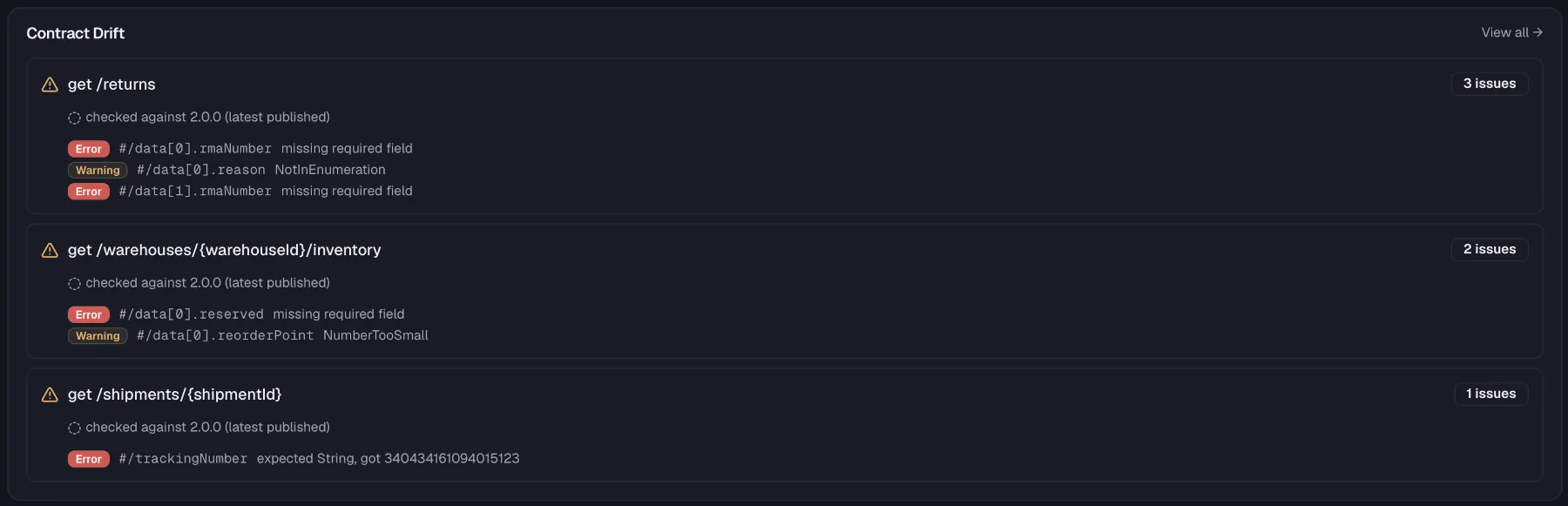
- Dashboard carries the Contract Drift card on the Health Dashboard, which appears while watched endpoints are drifting. Each entry shows the route, its total issue count, the contract version it was checked against, and the latest drift items with severity badges and the affected response path. View all → leads to the full list.
- Alerts come from the Schema Drift alert type in alert policies, which fires when drift of at least your chosen minimum severity is detected. An undocumented breaking change then pages you like downtime would.
Drift vs. contract testing
Schema drift detection and contract testing answer the same question from two sides, and that question is whether the implementation matches the spec. Contract tests run on demand or on a schedule in your test pipeline, while drift detection rides along on every monitor check against the live system. Use both, because tests catch drift before deployment and monitors catch it after.
Related
- Monitors — configuring validation when creating monitors
- Contract Drift — what happens to a deviation that keeps coming back
- Alert Policies — alerting on drift by severity
- Endpoints — the documented operations checks validate against
- Contract Testing — spec conformance checks in your test suite