

Region Selection
When you create a Routebase workspace, you choose where its data lives, either the European Union or the United States. The choice is permanent, so it's worth a moment's thought.
In short. Pick EU if you're a European company, work with European customers, or have any GDPR exposure. Pick US if your team and most of your traffic are in North America.
What a region is
Routebase runs as physically isolated deployments. Each region has its own database, object storage, monitoring, and background-job processing. Nothing is shared between regions, so everything you create stays in the region you chose, including projects, specifications, test data and uploaded files.
| Region | Hosting location |
|---|---|
| European Union | Frankfurt, Germany |
| United States | US West Coast |
A region can span more than one data centre in that location, and which one a given service sits in is an operational detail we may change. What does not change is the country.
You choose the region twice on your way in. The first time is on the Set up your workspace page, before you create your account. The second is the Hosting Region field in the onboarding wizard, right before your organization is provisioned. It's then recorded permanently against that organization.
Trade-offs
Compliance & data residency
| Concern | US region | EU region |
|---|---|---|
| GDPR | Standard contractual clauses (SCCs) apply; data leaves the EU | Data stays in the EU; SCCs not required for EU customers |
| CLOUD Act | US-hosted data can be requested under US law | Data is held on EU infrastructure, outside US jurisdiction |
| Schrems II | Requires additional safeguards for EU personal data | Not applicable — no transfer to a third country |
| EU data residency | Cannot satisfy EU residency requirements | Satisfies EU residency requirements |
If your customers, contracts, or auditors require EU data residency, choose the EU region.
Latency
Routebase is highly interactive, because the API designer, mock preview and test runner all round-trip to the server constantly. Pick the region closest to your team, since a cross-continent round-trip adds noticeable lag in editor-heavy flows.
Cost
Both regions cost the same.
Seeing your region in the app
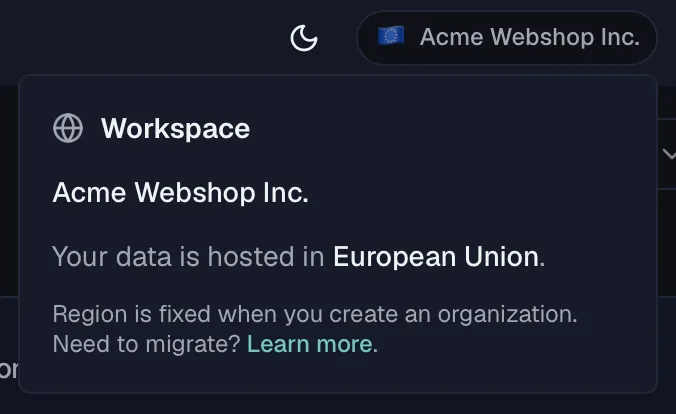
The workspace badge in the header shows your organization's name next to a region flag. Click it to see where your data is hosted. The popover reads "Your data is hosted in European Union" (or United States), and it reminds you that the region is fixed when you create an organization.
The flag always reflects where your organization's data actually lives, not which server happened to answer the request. Those can differ, because a European workspace reached through the US entry point still shows the EU on its badge.
What you can and can't change
- ✅ Organization name, billing, members, projects, specs — all editable as normal.
- ✅ Your login identity — the same email works across everything.
- ❌ The region of an existing organization. Changing it is a manual migration, not a setting.
Need to migrate?
Email support@routebase.dev with your organization name and the target region. Migrations are scheduled individually, usually take a few business days, and require a maintenance window during which the organization is read-only.
Frequently asked
Can a single account belong to organizations in both regions? An organization lives in exactly one region. Your login identity binds to one region's user record on first sign-in.
Does the region affect how I reach the app?
No. You always sign in at app.routebase.dev, and Routebase routes you to the region your organization lives in. There is no per-region address to remember.
Will you add more regions later? Possibly. Additional regions are on the long-term roadmap. We'll add one only when there's enough demand to keep both our latency and our compliance promises.
Related
- Onboarding — where the region choice happens
- Getting Started — from sign-up to your first spec
- Organization — organization settings