

Header Policies
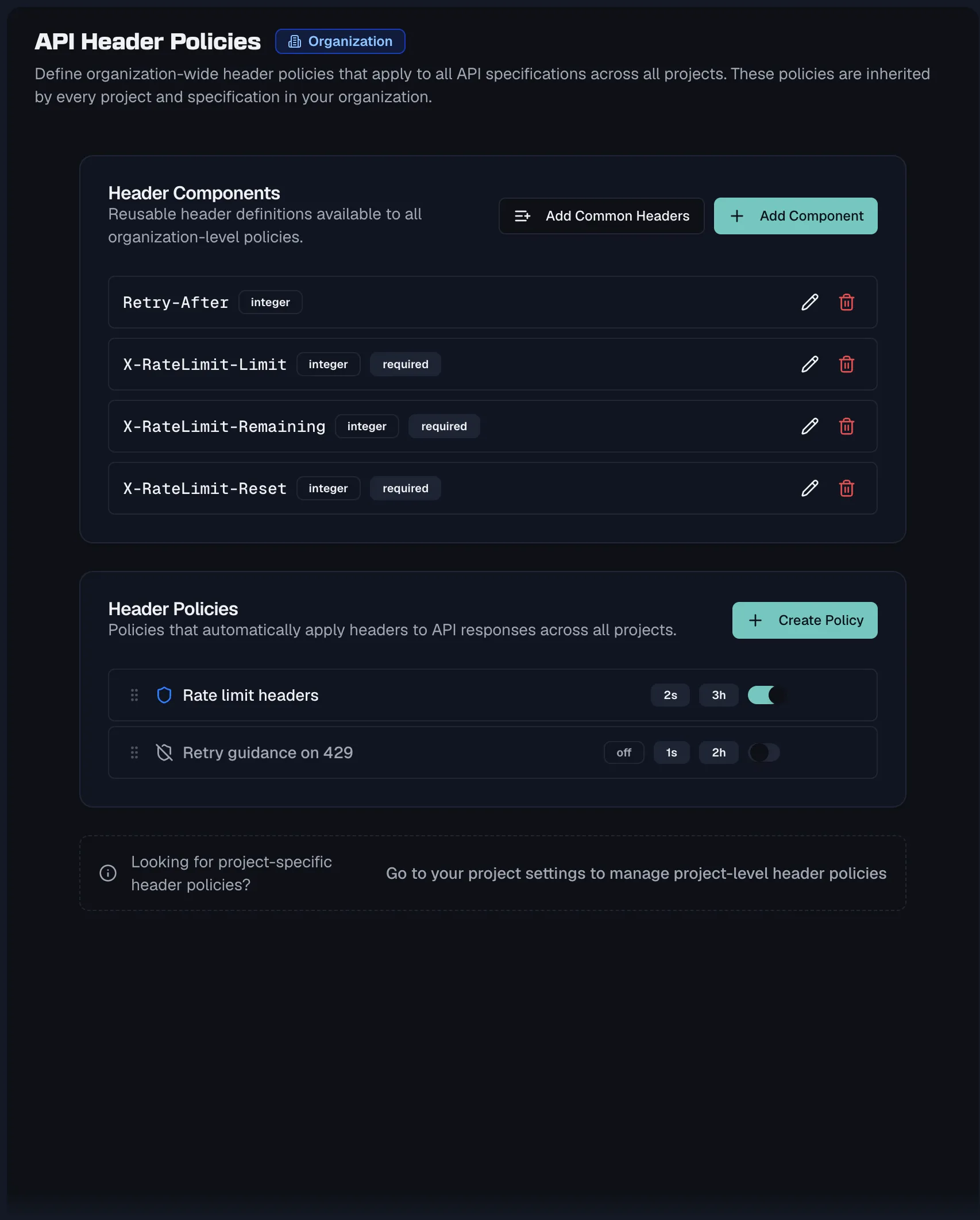
Header policies keep response headers consistent across your APIs. A policy bundles one or more reusable header components, such as rate-limit headers, and it automatically applies them to every response whose status code matches the policy's scopes. Policies cascade from the organization down to projects and individual specifications, so you define a standard once and every API inherits it.
Policies and header components
Two building blocks work together:
| Concept | What it is |
|---|---|
| Header component | A reusable definition of a single HTTP header, carrying a name such as X-Rate-Limit, a schema type of String, Integer, Number or Boolean, a required flag, and a description. Header components can also be attached to responses directly, independent of any policy. |
| Header policy | A governance rule that automatically applies a set of header components to all responses matching its status-code scopes. Policies can be enabled or disabled, they are priority-ordered, and they support per-response exclusions. |
Where policies live
Policies exist at three cascade levels, running from Organization to Project to Specification, and the most specific level wins where they overlap.
- Organization-wide policies are managed under Settings → API Header Policies, which describes itself as "Define organization-wide header policies that apply to all API specifications across all projects." Managing them requires the org:manage-governance permission, held by Admins and Owners. Members see them read-only.
- Project-level and specification-level settings show the same two cards, Header Policies and Header Components, scoped to that level.
Each Header Policies card lists the policies with a status icon, scope and header count badges, an enable toggle, and edit and delete actions. Drag the handle to reorder policies, because order determines priority, and the lower-priority policy yields when two policies overlap.
Creating a policy
- Click Create Policy.
- The Create Header Policy dialog opens, described as "Define a policy to automatically apply headers to responses matching specific status codes." Fill in these fields:
- Name is required and takes a descriptive name such as
Rate Limiting Headers. - Description is optional and says when and why this policy applies.
- Scopes decides which responses the policy targets, and you add at least one.
- Header Components picks the headers to apply, through the Select headers... multi-select.
- Name is required and takes a descriptive name such as
- Save. A toast confirms the policy was created.
Scopes
Scopes are status-code based. Quick-add buttons cover All status codes and the 2xx, 3xx, 4xx and 5xx classes, and you can also add an exact code such as 429, anywhere in the range 100 to 599. For endpoint-specific opt-outs, use exclusions instead of narrowing the policy.
Enabling and disabling
Every policy has an Enabled toggle with badges showing its state. When disabled, the policy stops applying headers to any responses, which helps when staging a policy before rolling it out.
Creating header components
The Header Components card describes itself at each level as "Reusable header definitions available to all policies", and it carries two actions:
- Add Component opens the Create Header Component dialog, which takes a Name such as
X-Rate-Limit, a Schema Type of String, Integer, Number or Boolean, a Required checkbox, and an optional Description. - Add Common Headers offers 14 pre-built standard headers, with any that already exist shown as disabled. They are
Authorization,Content-Type,Accept,X-Request-Id,X-Correlation-Id,Cache-Control,X-Rate-Limit-Limit,X-Rate-Limit-Remaining,X-Rate-Limit-Reset,X-API-Version,Accept-Language,If-None-Match,ETagandRetry-After. Select what you need and click Add Selected.
Header components are inheritable the same way policies are, from organization to project to specification. In the API Designer you can also attach a header component to a response directly, either through the header multi-select or by dragging it onto a response.
Impact analysis
When editing a policy, the Impact Analysis card shows exactly what it touches:
- A summary reading "This policy applies to N endpoint(s) across M response(s).", with badges for affected endpoint and conflict counts.
- Conflict warnings when the policy overlaps another, reading something like "Overlaps with {policy} on {scopes}" and naming the priority that decides the winner.
- A row per affected endpoint with its method, path, matching status codes, markers for local overrides and exclusions, and a jump-to-endpoint shortcut.
If nothing matches yet, the panel explains that "This policy has no matching endpoints. Add scopes and enable the policy to see affected endpoints."
Header inheritance in the API Designer
Inside a specification, the collapsible Header Inheritance section in the sidebar shows every policy affecting the spec, grouped by level as Org, Project and Specification, with an active-policy count. Each entry shows the policy's enabled state, name and header count. Hovering reveals its description and header list, and a link takes you to Manage policies at the right level.
Excluding a header on a single response
Sometimes one response legitimately should not carry an inherited header. Open the response and exclude the header. The Exclude Header dialog explains that "This will exclude the header {header} inherited from policy {policy} for this response only." and offers an optional Reason field to document why. Exclusions require write access to the spec through specs:write, and they only affect that one response, so the policy stays intact everywhere else.
Related
- Responses — where resolved headers appear
- Components — other reusable spec components
- Style Guide — organization-wide design rules
- Shared Library — org-wide shared schemas and responses