

Scanner Reference
Routebase runs 13 scanners across the OWASP API Security Top 10 from 2023, and some categories have more than one. You choose which scanners to run in a scan profile. This page documents what each one probes, the severity it raises, and the personas it needs. For the workflow around scanning, findings and scoring, start with the Security overview.
Scanner catalog
| Scanner | OWASP category | Personas needed | Severities raised |
|---|---|---|---|
api1-bola · Broken Object Level Authorization |
API1:2023 | 2+ | Critical |
api1-bola-enum · BOLA Enumeration (fallback) |
API1:2023 | 2+ | High |
api2-broken-auth · Broken Authentication (passive) |
API2:2023 | None | Critical, High |
api3-property-auth · Broken Object Property Level Authorization |
API3:2023 | 1+ | High, Medium |
api4-resource-consumption · Unrestricted Resource Consumption |
API4:2023 | None | High, Medium |
api5-bfla · Broken Function Level Authorization |
API5:2023 | 1+ | Critical |
api6-business-flow · Unrestricted Access to Sensitive Business Flows |
API6:2023 | None | Medium |
api7-ssrf · Server-Side Request Forgery |
API7:2023 | None | Critical, Medium |
api8-misconfig · Security Misconfiguration |
API8:2023 | None | High, Medium |
api8-tls-version · Legacy TLS Version |
API8:2023 | None | Medium |
api9-inventory · Improper Inventory Management |
API9:2023 | None | Medium |
fuzz-schema · Schema and Body Fuzzing |
API4:2023 | None | High, Medium |
fuzz-mutation · Mutation Fuzzing |
API4:2023 | None | High, Medium |
Scanners that need personas are disabled in the profile editor until you have enough personas in the project. If a persona-requiring scanner ends up with too few personas assigned at run time, it skips its checks and records that it was skipped in the run progress.
The two fuzzing scanners fuzz-schema and fuzz-mutation have a second gate. Even when selected, they stay silent until the profile's Fuzzing intensity is raised above Off. See Scan profiles for that setting.
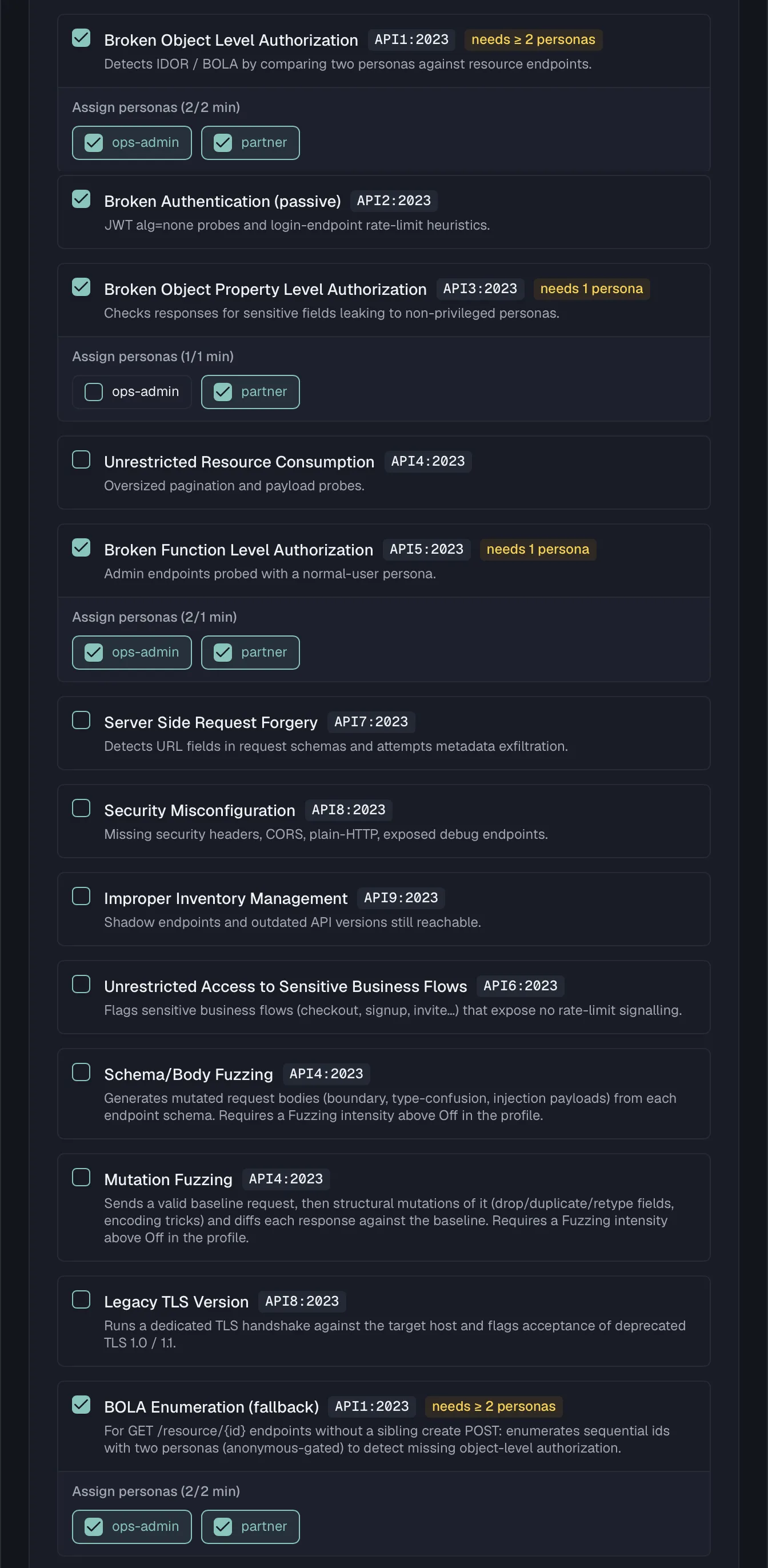
API1 — Broken Object Level Authorization (api1-bola)
This scanner requires two or more personas.
The BOLA scanner uses a create-then-read approach. For each GET /resource/{id} endpoint it looks for a matching create endpoint, meaning a POST /resource on the collection path. If it finds one, it does three things.
- It creates a resource as the first assigned persona.
- It extracts the id from the response body, looking for
id,uuid,publicId,_idand similar keys. - It reads that id back as the second persona.
If the second persona gets a 2xx response, the endpoint is not enforcing ownership and a Critical finding is raised. Endpoints without a matching create endpoint are skipped to keep false positives low, and the scanner probes at most 20 candidate endpoints per run.
Common false positives are genuinely public resources, and resources intentionally shared within a team or organization. Assign personas from different tenants for the most meaningful results, and exclude known-public resources by picking a spec that does not include them.
API1 — BOLA Enumeration fallback (api1-bola-enum)
This scanner requires two or more personas.
This scanner covers the GET /resource/{id} endpoints that api1-bola skips, which are the ones without a sibling create POST on the collection path. Instead of create-then-read, it enumerates sequential ids from 1 upward and looks for an endpoint that authenticates the caller but does not authorise per object. Because enumeration is weaker evidence than create-then-read, the heuristic is deliberately conservative:
- The enumerable check has the first persona read ids
1..N. If the first few return nothing, the id space is not sequentially readable, as with GUIDs, and the endpoint is abandoned. - The anonymous gate raises no finding if an unauthenticated request can already read a readable id, because the resource is public rather than access-controlled.
- Cross-persona identity requires that the two personas read the same objects for several ids, meaning identical response bodies. Those objects also have to be distinct from one another, so a single constant response for every id does not trigger it.
When those conditions hold, it raises a High, medium-confidence finding. It probes at most 10 endpoints per run.
Common false positives are deliberately shared or public catalogues that happen to sit behind auth. Use personas from different tenants so a real cross-tenant read is what the scanner is measuring.
API2 — Broken Authentication (api2-broken-auth)
No personas required. This scanner is passive and runs two probes.
| Probe | What it does | Severity / confidence |
|---|---|---|
JWT alg=none |
Sends every GET endpoint a bearer token whose header declares alg: none. A 2xx response means the server isn't validating the signature. |
Critical / Medium |
| Login rate-limit | Finds a login-style POST endpoint, matching paths such as login, signin, authenticate, auth/token and oauth/token, then fires up to 20 failed login attempts. If it never sees a 429 Too Many Requests, it raises a finding. |
High / Low |
Common false positives come from a gateway or WAF that strips malformed JWTs or rate-limits at the edge above the burst threshold. That hides these issues from the scanner, while the app-layer weakness may still exist behind it.
API3 — Broken Object Property Level Authorization (api3-property-auth)
This scanner requires one or more personas.
For each GET endpoint and each assigned persona, this scanner parses the JSON response and walks it recursively, matching property names against a dictionary of sensitive field names. A match becomes a finding, with the value truncated to 50 characters in the evidence so nothing sensitive is stored in full.
The dictionary is split into two confidence tiers:
| Confidence | Example field names | Severity |
|---|---|---|
| High | password, passwordHash, ssn, creditCard, cvv, apiKey, secret, privateKey, stripeCustomerId, access_token, refresh_token |
High |
| Medium | internalNote, internal_id, tax_id, vat_number, phone_number, billing_address, date_of_birth |
Medium |
Common false positives are fields named token that are not auth tokens, such as pagination or CSRF tokens, sandbox data that happens to match the patterns, and self-service fields like a user's own apiKey. Use personas with a clear privilege gap and review matches in context.
API4 — Unrestricted Resource Consumption (api4-resource-consumption)
No personas required. Three probes.
| Probe | What it does | Severity |
|---|---|---|
| Unbounded pagination | Sends collection GET endpoints ?limit=999999&pageSize=999999. If the endpoint returns 2xx instead of a 400 or a capped page, it flags the endpoint. |
High |
| Oversized payload | Sends POST endpoints a large JSON body, sized by the profile's Max probe payload setting and about 1 MB by default. A 2xx response means it was accepted and a 5xx means it crashed, and both are flagged, because a healthy server should reject it with 413 Payload Too Large. |
High |
| Rate-limit burst (opt-in) | Fires a short burst of rapid GET requests at the first collection endpoint. If it never sees a 429 Too Many Requests, it flags the endpoint. It runs only when the profile's Enable rate-limit probe toggle is on, which is off by default because a burst can stress a shared target. |
Medium |
The oversized-payload size and the rate-limit-burst opt-in are both set on the scan profile. See Scan profiles.
Common false positives are APIs that silently cap results regardless of the requested limit, and endpoints designed to accept large bodies such as file upload or bulk import. A gateway that rate-limits at the edge above the burst threshold also hides the burst probe.
API5 — Broken Function Level Authorization (api5-bfla)
This scanner requires one or more personas.
The BFLA scanner classifies endpoints as admin endpoints by a path heuristic. It matches paths containing /admin, /internal, /management, /manage, /system, /superuser, /sudo or /root, and it also uses spec tags naming those areas once they are present. It then calls each admin-looking endpoint using the assigned normal-user persona. Any 2xx response is a Critical finding, because a non-admin reached an admin function, while 400, 401, 403 and 404 are treated as the endpoint correctly rejecting the request.
Common false positives are endpoints with admin in the path that are intentionally public, such as /admin/health, and feature names that happen to contain the word admin. Pick a spec scoped to the surface you actually want tested.
API6 — Unrestricted Access to Sensitive Business Flows (api6-business-flow)
No personas required. The scanner flags state-changing endpoints, meaning POST, PUT, PATCH and DELETE, whose path or spec tags identify them as a sensitive business flow. It matches keyword tokens such as checkout, purchase, order, payment, transfer, signup, register, invite, redeem, coupon, vote and subscribe.
The probe is deliberately passive. It sends a single OPTIONS request per matched endpoint rather than the real write, which would trigger the flow, and it inspects the response headers for rate-limit signalling in Retry-After, X-RateLimit-* and RateLimit-*. If none are present, it raises a Medium, low-confidence finding. The absence of those headers is a hint rather than proof that the flow is unthrottled and open to automation abuse such as scalping, spam, coupon abuse or credential stuffing. No burst or flood probe is performed here, since that DoS-shaped check lives behind the opt-in in api4-resource-consumption.
Common false positives are flows protected by rate-limiting, bot detection or step-up challenges that do not surface a rate-limit header on an OPTIONS response. Another is an endpoint whose path merely contains a keyword without being a real flow. Treat every finding as a prompt for a manual check.
API7 — Server-Side Request Forgery (api7-ssrf)
No personas required.
This scanner inspects POST and PUT request body schemas for URL-shaped fields, meaning property names like url, uri, link, callback, webhook, redirect, target, endpoint, host, image, imageUrl, fetch and src. For each such field it submits a set of SSRF payloads:
| Payload | Target |
|---|---|
http://169.254.169.254/latest/meta-data/ |
Cloud instance metadata |
http://localhost:22 |
Internal service probing |
file:///etc/passwd |
Local file read |
It detects a hit two ways. A response that echoes metadata markers such as cloud metadata fields, SSH banners or /etc/passwd contents raises a Critical finding. A successful response that takes longer than 5 seconds suggests the server made an outbound call, and that raises a Medium, low-confidence finding.
Common false positives are URL fields validated server-side, where the scanner cannot see the validation. Others are slow responses caused by network latency rather than SSRF, and URL fields the server only stores or displays but never fetches.
API8 — Security Misconfiguration (api8-misconfig)
No personas required. Four checks.
| Check | What it looks for | Severity |
|---|---|---|
| Plain HTTP | The environment base URL uses http:// instead of https://. |
High |
| Security headers | Missing Strict-Transport-Security, X-Content-Type-Options, X-Frame-Options or Content-Security-Policy on endpoint responses. |
Medium |
| CORS wildcard | A response returns Access-Control-Allow-Origin: *. |
High |
| Debug endpoints | The paths /debug, /trace, /actuator and /actuator/health respond successfully at the base URL. |
Medium |
Header and CORS checks probe each endpoint with a HEAD request, falling back to GET, while the plain-HTTP check produces a single finding for the whole target.
Common false positives are internal APIs where a CORS wildcard is acceptable, development environments that intentionally expose debug endpoints, and reverse proxies that add security headers above the origin the scanner sees. Point the scan at the proxied URL for accurate header results.
API8 — Legacy TLS Version (api8-tls-version)
No personas required. api8-misconfig can only report plain http://, because the HTTP client hides the negotiated TLS protocol. This scanner fills that gap. It runs a dedicated TLS handshake against the target host once per run and raises a Medium, high-confidence finding only when the host provably completes a handshake using deprecated TLS 1.0 or TLS 1.1. A plain-HTTP base URL is skipped, because there is no TLS layer to probe and api8-misconfig already covers it.
TLS 1.0 and TLS 1.1 are deprecated under RFC 8996 and fail modern baselines such as PCI DSS. The remediation is to disable them at the load balancer or reverse proxy and serve TLS 1.2 and above only.
Common false positives are none of note, because the finding is only raised on a completed weak-protocol handshake.
API9 — Improper Inventory Management (api9-inventory)
No personas required. Two discovery probes, both raising Medium findings.
| Probe | What it does |
|---|---|
| Old versions | If the base URL path contains /vN, the scanner requests every lower version from /v{N-1} down to /v0. Any that responds successfully is flagged as a still-reachable old version. |
| Shadow endpoints | Sends OPTIONS to /admin, /api/internal, /health, /metrics, /swagger and /openapi.json. A path that answers with 2xx, 401 or 403 is flagged as an undocumented reachable endpoint. |
Common false positives are intentionally maintained and patched old versions, plus health and metrics endpoints that are meant to be reachable for monitoring.
Schema/Body Fuzzing (fuzz-schema)
No personas required. Requires Fuzzing intensity above Off in the profile, because even when selected the scanner sends no requests while intensity is Off. See Scan profiles.
For every write endpoint that declares a request-body schema, meaning POST, PUT and PATCH, the scanner generates mutated bodies from that schema and looks for three failure classes. The mutations cover boundary values, type confusion, format violations and an injection dictionary, with more payload classes enabled at higher intensity.
| Failure class | What it means | Severity |
|---|---|---|
| server-error | A mutated body drove the handler to a 5xx. | High |
| type-leak | The response echoed a stack trace or framework error. | Medium |
| missing-validation | A payload a spec-compliant server should reject (wrong type, bad format, out of range) was accepted with a 2xx. | Medium |
Findings are clustered per endpoint, field and error class, so a large payload set produces one finding per real issue rather than a flood. The scanner honours a hard per-scan request cap and the profile's time budget.
Common false positives are endpoints that intentionally coerce loose input, and validation performed downstream that the scanner cannot observe.
Mutation Fuzzing (fuzz-mutation)
No personas required. Requires Fuzzing intensity above Off in the profile, which is the same gate as fuzz-schema.
This scanner starts from a valid baseline request and sends it. Only if the baseline is accepted with a 2xx does it fire structural mutations, which drop or duplicate fields, retype values and apply encoding tricks, and it diffs each response against the baseline. The baseline comparison is what sets it apart from fuzz-schema, because a 5xx here means a mutation broke an endpoint that provably worked a moment earlier. It reports the same three failure classes and severities as fuzz-schema, so server-error is High while type-leak and missing-validation are Medium, clustered the same way and under the same request cap and time budget.
Common false positives are endpoints with lenient input handling by design, as with fuzz-schema.
Not covered
One OWASP API Security Top 10 category has no scanner:
| Category | Why it isn't automated |
|---|---|
| API10:2023 — Unsafe Consumption of APIs | Requires analysis of the upstream and third-party APIs your service calls, which are outside the scanner's visibility into your API surface. |
Related
- Security overview — scans, findings, and the security score
- Security personas — the identities that authorization scanners need
- Scan profiles — selecting scanners and assigning personas
- Security in CI/CD — running these scanners from a pipeline and exporting findings as SARIF