Deprecation
Deleting an endpoint is fast and someone else pays for it. Deprecating it is the alternative. The endpoint stays in the spec, everyone who reads the documentation sees that it is going away and by when, and there is a written answer to the question of what to use instead. Routebase turns that into a dated plan with phases, reminders and an approval step, rather than a checkbox somebody flips.
Two things are worth being clear about before the details, because they decide what this feature can and cannot do for you:
- A deprecation plan is a contract statement rather than a traffic control. Routebase does not sit in front of your production API, so nothing here throttles or blocks a real consumer. What it does is publish the intent in your spec, in your portal and in the OpenAPI you export, then track the deadline.
- The one place behaviour does change is the Routebase mock server. If your consumers develop against a Routebase mock, the plan's sunset policy is applied there, as described under Sunset policy.
The phases
A deprecation moves through phases rather than flipping from working to gone. Seven of them exist:
| Phase | What it means |
|---|---|
| Pending approval | Created, waiting for an admin. Only when the org policy requires approval. The endpoint is not deprecated yet. |
| Rejected | An admin declined the plan. Terminal. |
| Announced | The plan is public. The endpoint works normally. |
| Grace period | The window consumers have to migrate. |
| Sunset phase | The final stretch before the sunset date. This is where the mock server changes behaviour. |
| Retired | Past the sunset date. |
| Cancelled | The deprecation was called off and the endpoint stays. It is reachable from pending approval, announced or grace period. |
stateDiagram-v2
    state "Pending approval" as PA
    state "Announced" as AN
    state "Grace period" as GP
    state "Sunset phase" as SP
    state "Retired" as RT
    state "Rejected" as RJ
    state "Cancelled" as CX

    [*] --> PA: org policy requires approval
    [*] --> AN: no approval required
    PA --> AN: an admin approves
    PA --> RJ: an admin declines
    AN --> GP: automatic, at once
    GP --> SP: automatic, when the window opens
    SP --> RT: by hand — unless Automatic Shutdown is on
    PA --> CX
    AN --> CX
    GP --> CX
Phases advance on their own, because a background job checks every hour and moves plans on when their dates come due, announcing the transition as it goes. You do not have to click anything for a plan to progress from announced to grace period to sunset.
Retirement is the one exception, and it is deliberate. A plan is only retired automatically if you turned on Automatic Shutdown when you created it. Otherwise it sits in the sunset phase past its sunset date, waiting for a human. The reasoning is that "the date passed" and "we are ready to remove it" are different statements, and only one of them is safe to make from a timer.
Creating a plan
Open the endpoint in the API Designer. The Deprecated toggle in the editor header is the quick way to mark something as on its way out, because it sets the flag in the spec and nothing else. For an endpoint consumers actually call, use the deprecation wizard, which turns that flag into a plan with a date.
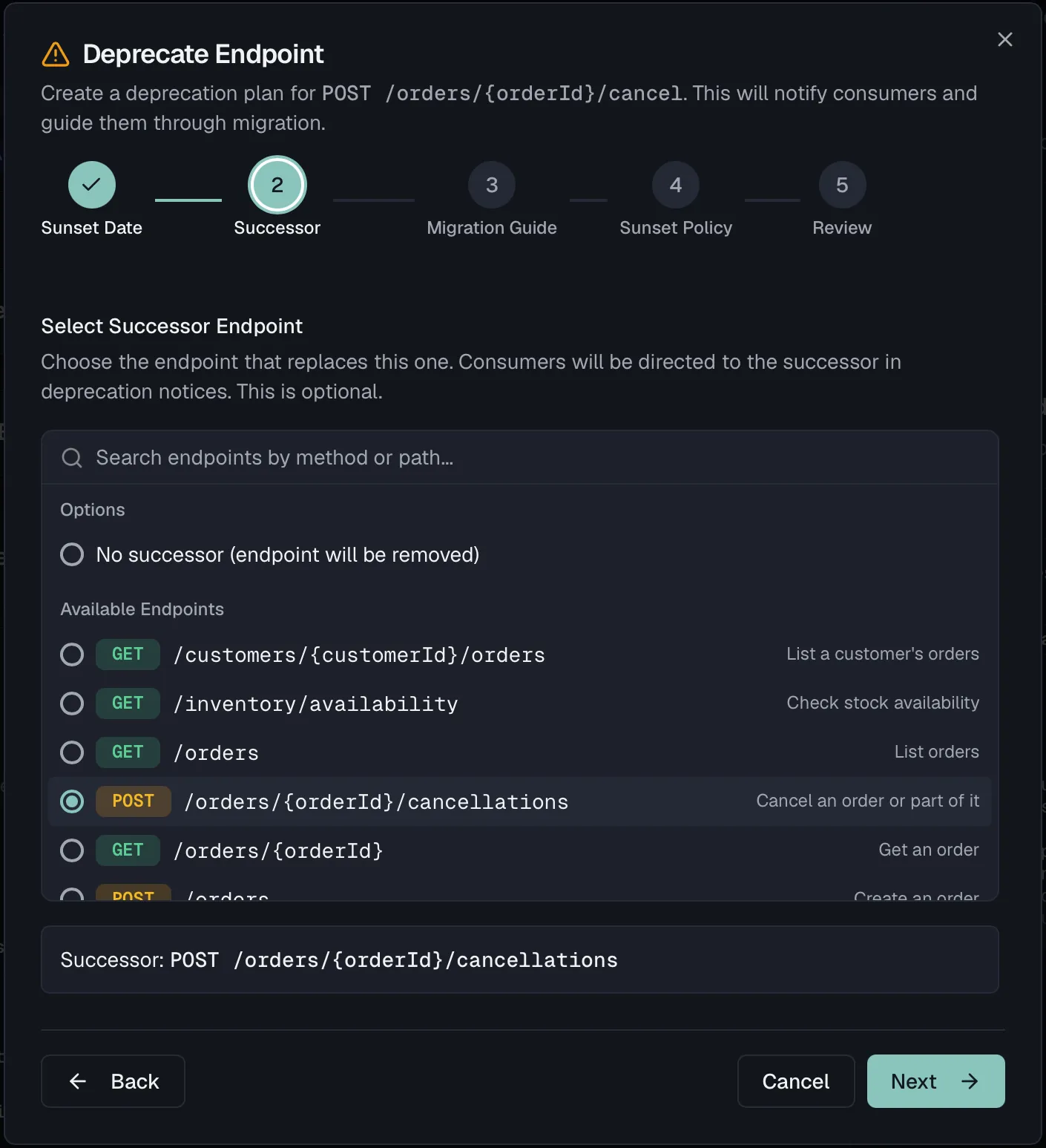
The wizard has five steps:
- Sunset Date is when the endpoint stops being available. It is validated against your organization's minimum grace period, and a date that is too soon is refused with the number of days required.
- Successor lets you search your endpoints by method or path and pick the one that replaces this one, or leave it empty when the endpoint is going away without a replacement. The successor travels with the deprecation, so a consumer reading the docs sees where to go next. Your organization can make this mandatory.
- Migration Guide holds the instructions for the people who have to change their code. This is the part that decides whether a deprecation is a courtesy or a nuisance. It is required by default, and a template is offered as a starting point.
- Sunset Policy decides what happens as the date approaches, as described below.
- Review shows the whole plan on one screen before anything is announced.
You can step back to any completed step from the progress indicator at the top.
Sunset policy
Three switches take effect in the sunset phase, and all of them apply to requests against a Routebase mock server for this endpoint:
- Deprecation Warning Header adds a
Warning: 299header naming the sunset date and, where one is set, the successor endpoint. The header field itself is obsolete, because RFC 9111 replaced RFC 7234 and droppedWarningon the grounds that it is not widely generated or surfaced to users. It is still sent for clients that read it. The machine-readable signals are theDeprecationheader (RFC 9745) and theSunsetheader (RFC 8594). Both go out regardless of this switch, as soon as the plan has a sunset date, so the switch only adds the human-readable warning on top. - Reduced Rate Limiting cuts the mock rule's rate limit by the percentage on the slider for the whole sunset phase, and it marks throttled responses with
X-RateLimit-Deprecated: true. The cut happens in one step when the phase begins rather than ramping up towards the sunset date. It only does something if the mock rule already has a rate limit configured, because without one there is nothing to reduce. - Automatic Shutdown retires the plan on its own once the sunset date passes, instead of leaving it for a person. Its soft shutdown window is the number of days before sunset in which the mock starts answering
410 Goneinstead of the normal response. Consumers therefore hit the removal in testing before they hit it in production.
If your consumers do not use a Routebase mock, leave these off, because they will not do anything.
Approval
When your organization requires approval, a new plan starts in Pending approval and the endpoint is not yet deprecated. The endpoint's deprecation panel says so explicitly, and it offers an admin Approve and Reject, where rejection requires a comment.
Approval moves the plan to announced and starts the clock. Rejection is terminal, so the plan is closed and a new one has to be created.
Watching a plan
The endpoint's Deprecation panel in the designer shows the live state, which is the phase, the sunset date, the successor, and two numbers worth explaining:
- Usage (last 30 days) gives request counts and unique consumers.
- Migration progress shows as a bar how far usage has fallen from the first day the plan was tracked to the most recent one.
Both numbers count requests against the Routebase mock server only. They are a good signal when your consumers develop against your mocks, and they are silent about production traffic, because Routebase never sees it. A migration progress of 100% means nobody is calling the mock any more, not that nobody is calling your API.
Alongside them, Routebase flags a plan whose usage has been zero for 14 consecutive days, which is the closest thing to an "it is safe to remove this" signal the data can give.
The deprecation dashboard
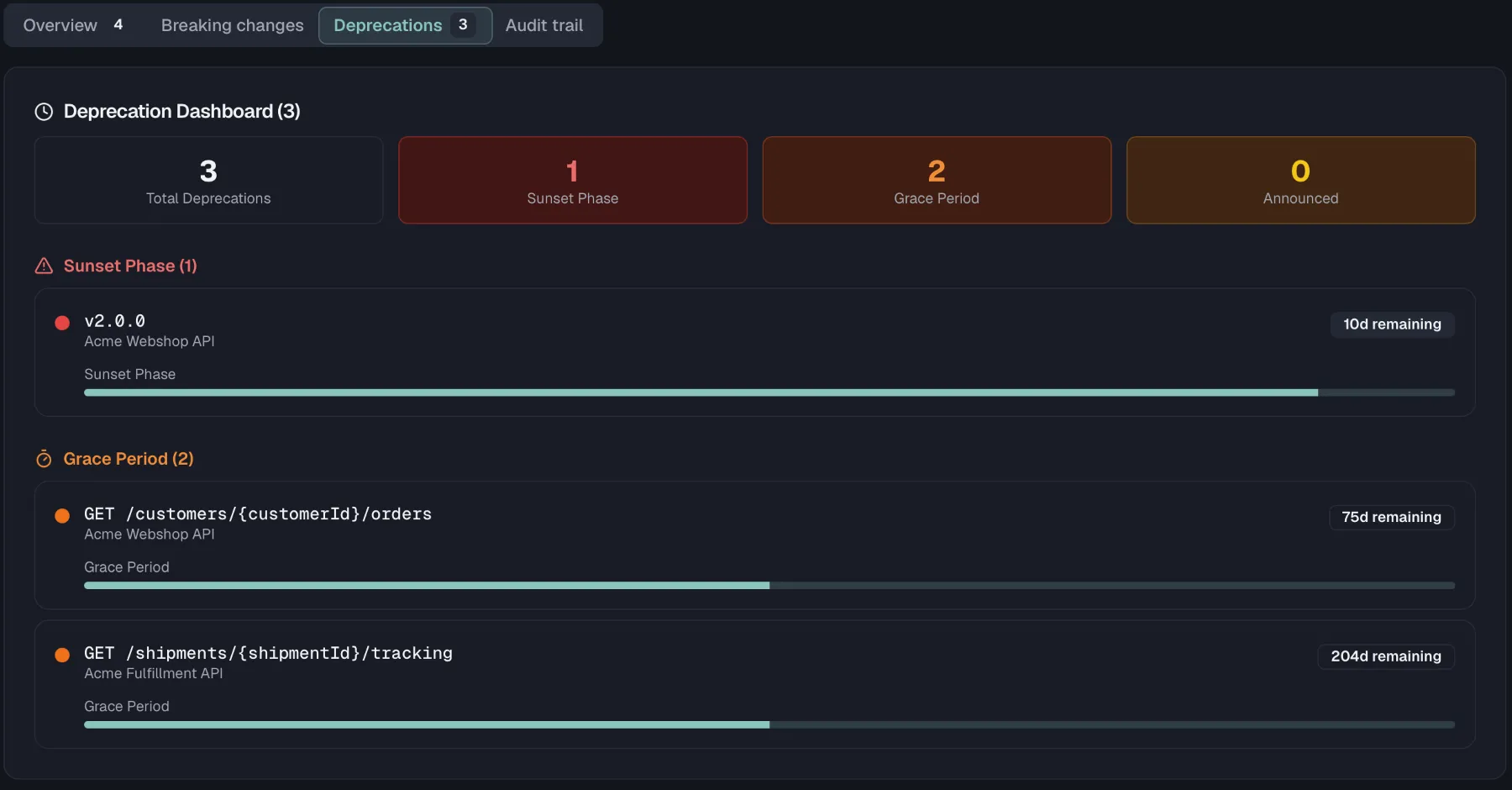
Settings → Governance carries a Deprecation Dashboard across the whole organization, and it needs Pro or above plus org:manage-governance. It shows totals per phase, then every plan grouped into sunset phase, grace period and announced, ordered by urgency. Selecting one opens its details.
Changing, cancelling, and retiring
From the endpoint's deprecation panel you can:
- Edit the sunset date and the migration guide while the plan runs.
- Cancel the plan. The endpoint stays and the deprecation disappears from the portal.
Retiring a plan by hand is available through the API and the MCP tool retire_deprecation. That applies to a plan past its sunset date without automatic shutdown.
Retiring records that the deprecation ran its course. It does not delete the endpoint from your spec, because removing it is a separate and deliberate edit, and one that counts as a breaking change.
What consumers see
On a published portal, a deprecated endpoint's page carries a banner with the sunset date, the number of days remaining, the rendered migration guide, and a link to the successor where one is set. This is why the migration guide is worth writing properly: it is the text a consumer reads at the moment they discover the problem.
The banner is controlled by the Show deprecation info switch in your portal settings, and only announced plans reach it, never pending ones. See Portal Branding for the portal's feature switches.
Consumers on your team are notified as well. They get an announcement notification when the plan goes live, plus sunset reminders at 30, 14, 7 and 1 days before the date by default.
Organization policy
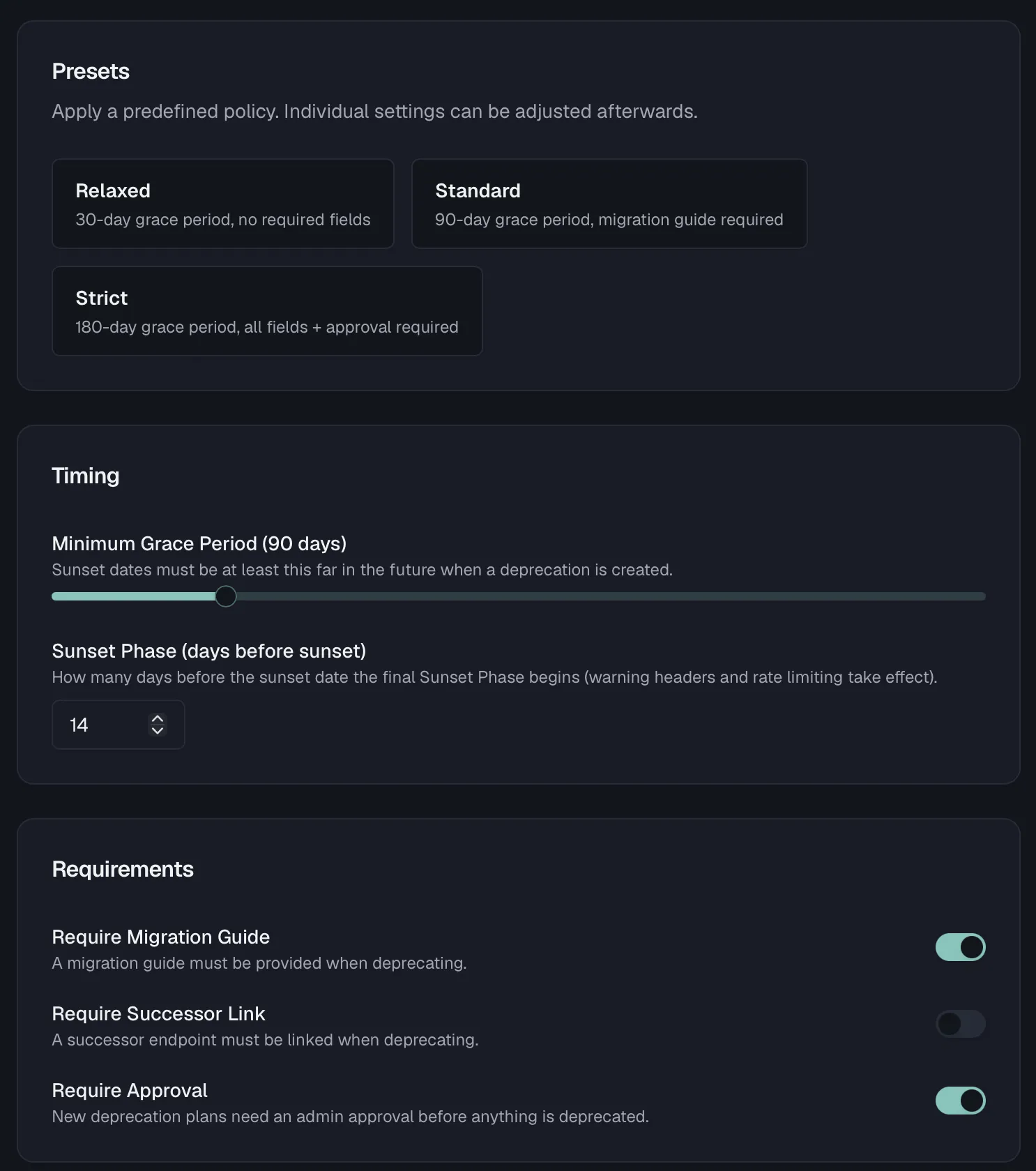
Settings → Deprecation Policy, which needs org:manage-governance, sets the floor for every deprecation in the organization, so one person cannot rush one through on a Friday afternoon.
Start from a preset and adjust:
| Preset | Minimum grace period | Sunset phase | Requirements |
|---|---|---|---|
| Relaxed | 30 days | 7 days | none |
| Standard | 90 days | 14 days | migration guide |
| Strict | 180 days | 30 days | migration guide, successor link, approval |
The individual settings behind them:
- Minimum grace period is the shortest allowed gap between announcement and sunset. A wizard that proposes a closer date is refused.
- Sunset phase says how many days before the sunset date the sunset phase begins.
- Require migration guide and Require successor link make those wizard steps mandatory.
- Require approval decides whether plans start in pending approval.
- Notify on announcement and Send sunset reminders control the notifications, with the reminder schedule as a set of checkboxes for 60, 30, 14, 7, 3 and 1 days before sunset.