

API Design Settings
Most of the API Designer needs no configuration, and this page covers the settings worth knowing about when the defaults do not fit. They sit at three levels. Personal editor preferences follow you across projects and affect nobody else, per-specification settings belong to a single spec, and a third set of choices is made when you create or import a spec. Those last ones cover the OpenAPI version and, later on, the release target and export formats of each version.
Personal preferences
Open Settings → API Designer to configure your personal editor preferences. Changes are saved automatically, apply immediately and are stored locally per user, so they don't affect teammates. A Reset to Defaults button restores everything.
Editor
| Setting | Description | Default |
|---|---|---|
| Auto-Save | Automatically save changes after editing. | On |
| Save Delay | How long after your last edit auto-save triggers (0.5s–5s). | Shown when Auto-Save is on |
| Default HTTP Method | Method preselected for new endpoints (GET, POST, PUT, PATCH, DELETE, HEAD, OPTIONS). | GET |
| Default Content Type | Content type preselected for new bodies (application/json, application/xml, application/x-www-form-urlencoded, multipart/form-data, text/plain). |
application/json |
| Path Parameter Warnings | Show warnings for undocumented path parameters. | On |
Display
| Setting | Description | Default |
|---|---|---|
| Property Descriptions | Show descriptions inline in schema properties. | On |
| Code Preview Font Size | 12px Small / 14px Default / 16px Large. | 14px |
| JSON Indentation | 2 or 4 spaces. | 2 |
| Reset Panel Sizes | Restore the default layout of resizable panels. | — |
Validation
| Setting | Description | Default |
|---|---|---|
| Validation Strictness | Relaxed (show only critical errors), Normal (show errors and important warnings), or Strict (show all issues including best practice suggestions). | Normal |
| Show Warnings | Include warnings in validation output. | On |
| Real-time Validation | Validate as you type (may affect performance). | On |
Shortcuts
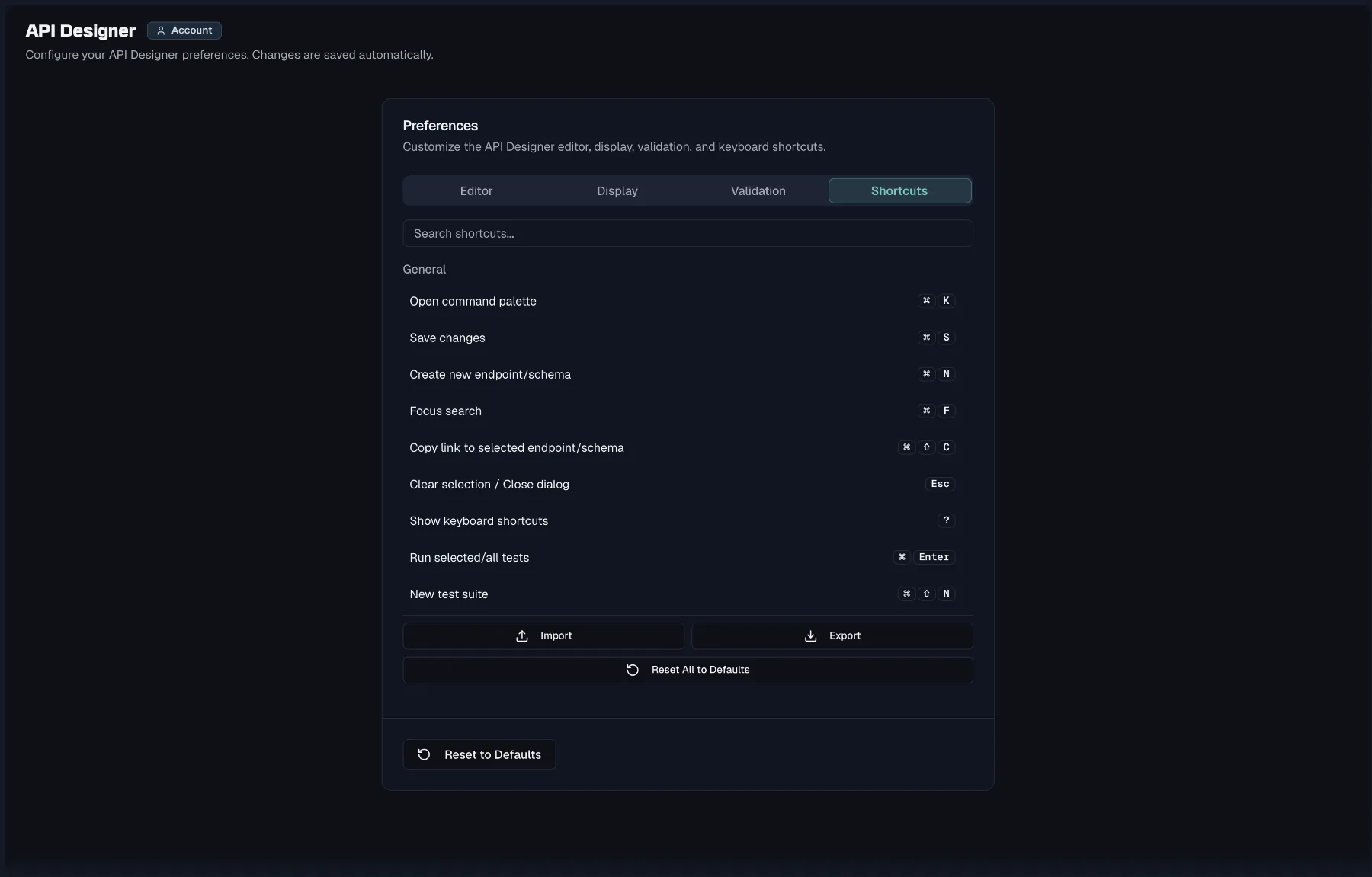
This tab holds a searchable list of every keyboard shortcut. Rebind any shortcut by recording a new key combination, and modified shortcuts get a Modified badge while conflicts are flagged. You can reset shortcuts individually or all at once, and Import/Export your bindings as a JSON file.
Quick settings
The Quick Settings popover in the designer toolbar exposes the two most-used preferences, Auto-Save and validation strictness, and it links to All API Designer Settings.
Per-spec settings
Open Spec Settings from within a specification. The sheet contains four cards (editing requires specs:write):
- General holds the spec's Name, its Base Path, which is a path prefix for all endpoints such as
/billing/v1, and its Server URL. On an OpenAPI 3.2 specification it also holds the Document URI ($self), which the export writes as$self, the URI other documents use to reference this one and the base for its relative references. - Versioning Strategy sets how consumers select a version, through the URL path, a header, a query parameter or content negotiation, and it also holds version aliases and sunset dates. Covered in detail in Versioning.
- Editor Preferences is a shortcut to your personal Auto-Save and validation settings ("Personal editor settings. These apply immediately and are stored locally.").
- Danger Zone offers Delete this specification, which permanently deletes the spec and all its versions, endpoints and schemas after a confirmation dialog. It requires the specs:delete permission, which Admins and Owners hold.
A sticky Save Changes button appears once you've modified anything.
Creating a specification
Click to create a new spec and the New API Specification wizard asks how you want to start:
| Mode | Description |
|---|---|
| Import | Import OpenAPI, Postman, or Insomnia files. |
| Empty Specification | Start with a blank canvas and add endpoints. |
| Use Template | Start with a pre-built template (CRUD, Auth). |
For Empty and Template modes you fill in the spec's Name, Version, OpenAPI Version, Base Path and Description. Semantic versioning is expected, so the wizard warns if the version isn't MAJOR.MINOR.PATCH, because publishing and diffing rely on it. The available templates are REST CRUD, Authentication and Blank, and each one lists how many endpoints it scaffolds.
OpenAPI version
Specs are authored as OpenAPI 3.0, OpenAPI 3.1 or OpenAPI 3.2, and new specs default to 3.2. Some style-guide rules apply to 3.0 documents only, and the version affects how nullability and numeric bounds are expressed.
Importing an existing API
Choose Import in the wizard to bring in an OpenAPI file, a Postman collection or an Insomnia export. Import & Export has the full flow, covering the entry points, the preview, the import options and what to do when validation fails.
Renaming and deleting
- Rename API Specification changes the spec's Name and Base Path.
- Delete API Specification permanently removes the spec, warning that "All endpoints, schemas, and versions associated with this specification will also be deleted." It requires specs:delete.
Releasing and exporting
A version is released through the Release Version wizard, which freezes it and optionally promotes it into an environment. The environment's roles decide whether the release also feeds the public documentation. See Versioning for the full release flow.
Freezing is also what makes a version exportable, in YAML, JSON, Postman or Insomnia form. See Import & Export for the download flow.
Related
- Versioning — versioning strategy, publishing, and exports
- Endpoints — working inside the designer
- Style Guide — validation rules behind the strictness settings
- Projects — where specifications live