

Components
Components are reusable building blocks defined once per specification and referenced from many endpoints. Instead of repeating the same NotFound response, CreateUser request body, or PageSize parameter on every operation, you define it as a component, reference it everywhere, and update it in one place. Components map directly to OpenAPI's components section, so they import and export cleanly.
The Components section
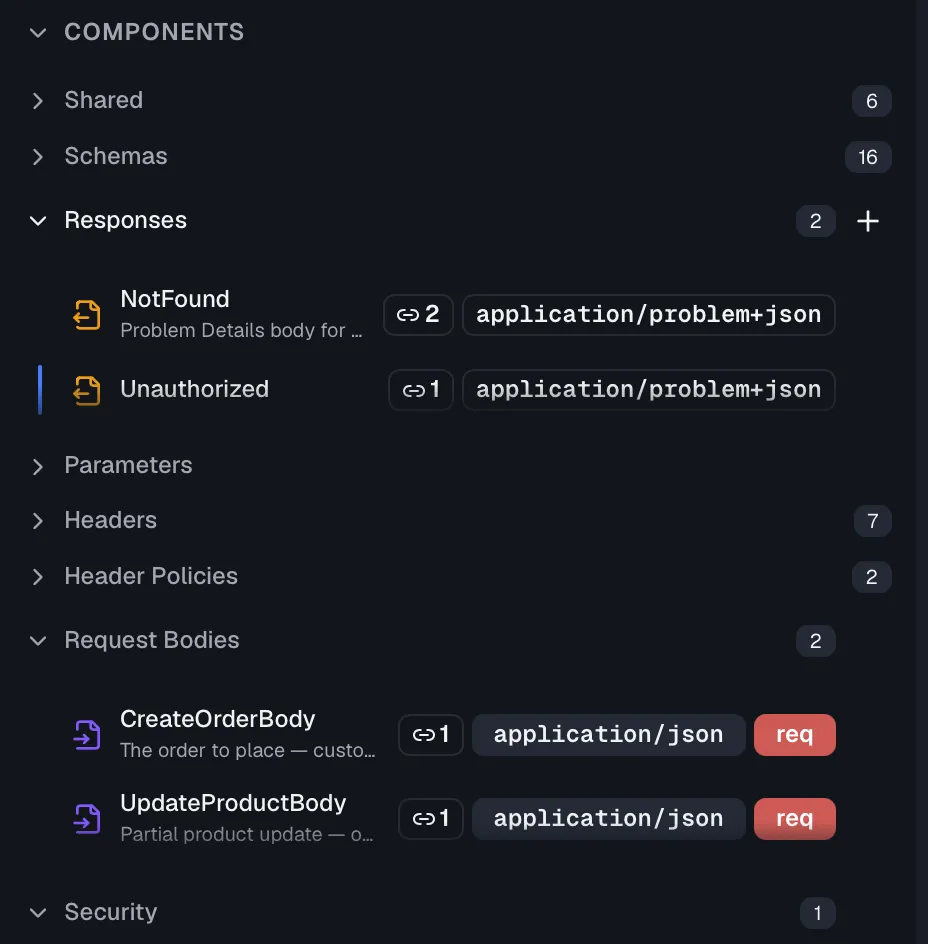
The Components section at the bottom of the designer sidebar groups all reusable definitions of the selected version:
| Subsection | What it holds |
|---|---|
| Shared | Components linked from the cross-project shared library. |
| Schemas | Reusable data structures, covered under Schemas. |
| Responses | Complete reusable responses, with content type, body, headers and example. |
| Parameters | Reusable parameter definitions. |
| Headers | Reusable response-header definitions. |
| Header Policies | Rules that inject headers across endpoints, covered under Header policies. |
| Request Bodies | Reusable request body definitions. |
| Media Types | Reusable media type definitions, shown on OpenAPI 3.2 specifications only. |
| Security | Security schemes applied to endpoints. |
Each subsection has a + button to create a component, shows a usage-count badge per item, and lists validation issues as a colored status line. Component names use PascalCase, as in NotFound, CreateUser or BearerAuth, and the create dialogs enforce this.
Response components
A response component packages everything a response needs under a name like NotFound or ValidationError. That covers the description, content type, body as inline properties or a linked schema, headers, and example.
- Create one from the Responses subsection, or extract one from an existing endpoint response with Extract to Component, which re-links the endpoint to the new component automatically.
- Use it by dragging the component from the sidebar onto an endpoint's responses area. Dropping adds a response backed by the component, or replaces the one you drop it on. The response card then shows the component's badge, and clicking it jumps to the component editor.
- Update the component and every endpoint that references it reflects the change.
Request body components
A request body component defines a Content Type, a Required flag, a description, and the body structure as inline properties or a linked schema. The content type is application/json, application/xml, or a form, text or binary type.
- Create one from the Request Bodies subsection, or extract from an endpoint with Extract to Component on the request body editor.
- Use it by dragging it onto an endpoint's request body area. The drop zone shows "Drop component here to link", or "Drop to replace with component" if a body already exists. The linked component appears as a badge on the endpoint.
Media type components
OpenAPI 3.2 lets a specification define reusable media types under components.mediaTypes. A media type component holds the body schema as inline properties or a linked schema, the item schema of a sequential media type such as JSON Lines or Server-Sent Events, and an example. It carries no content type and no description, because the specification defines the Media Type Object without them, so the response or request body that uses the component keeps its own content type.
- Create one from the Media Types subsection, which appears once the specification is on version 3.2. The editor switches between Schema and Item schema, and both are kept.
- Use it from the content type row of a response, a request body, a response component or a request body component. The link icon opens a picker, the linked component appears as a badge, and the row's own schema and example become read-only while the link exists. The exported document writes the entry as a
$refto the component. - Unlink with the badge's close button. The row keeps the schema, item schema and example it showed while the link existed, as its own copy, so nothing disappears from the endpoint.
Parameter components
A parameter component captures a parameter definition, so recurring parameters like pagination or tenant headers have one source of truth. It holds a Location of Query, Path, Header or Cookie, plus Schema Type, Format, Example Value, Default Value, Required and Deprecated. Create them from the Parameters subsection. Specs imported from OpenAPI keep their $ref parameters as parameter components, and each component's Used by section lists the endpoints that reference it.
Header components
Header components are reusable response-header definitions, carrying a name such as X-Rate-Limit plus a schema type, a required flag and a description. Link them from a response's headers table, or let header policies inject them across endpoints. Headers defined at the organization or project level in Settings appear here as inherited, read-only entries alongside your spec-level headers.
Security schemes
Security scheme components describe how your API authenticates callers. Four types are supported, which are HTTP, API Key, OAuth2 and OpenID Connect. Create a scheme such as BearerAuth from the Security subsection, then attach it to endpoints with the Add button next to the security badges in the endpoint editor header. Each endpoint lists its assigned schemes as removable badges.
An OAuth2 scheme carries its flows as a JSON object with the keys authorizationCode, implicit, password and clientCredentials. On an OpenAPI 3.2 specification the editor shows three more fields, because the specification introduced them in that version. A Deprecated switch marks a scheme of any type that consumers should stop using, and the component list and the endpoint badges show the mark. An OAuth2 Metadata URL points to the authorization server metadata document (RFC 8414). The flows object accepts a fifth key, deviceAuthorization, with deviceAuthorizationUrl, tokenUrl and scopes for the device authorization flow (RFC 8628). Saving any of the three on a 3.0 or 3.1 specification is rejected, so the exported document stays valid for its version.
Assigning a scheme to many endpoints
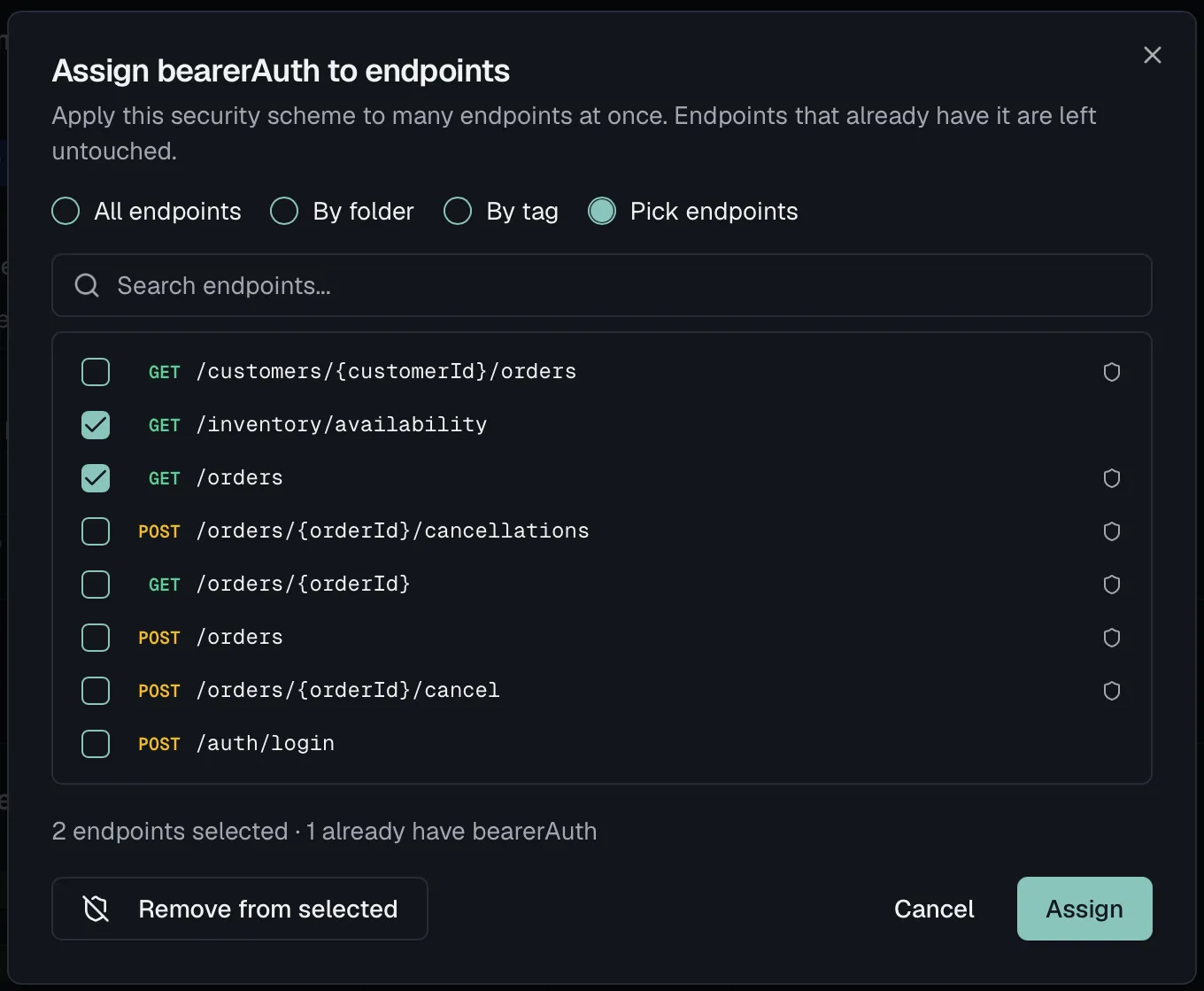
Attaching BearerAuth to sixty endpoints one badge at a time is the kind of task people skip, and an endpoint nobody got around to securing looks exactly like one that is deliberately public. Assign {scheme} to endpoints does it in one step, with four ways to choose the targets:
| Scope | Targets |
|---|---|
| All endpoints | Everything in the specification. |
| Folder | One folder, which you pick from the list. |
| Tag | Everything carrying one tag. |
| Manual | Search and tick individual endpoints. |
Endpoints that already carry the scheme are marked Already assigned rather than silently skipped, and a preview shows what the assignment will touch before you confirm.
Usage tracking and validation
Every component editor has a Used by section listing the endpoints that reference it, and clicking an entry jumps to that endpoint. In the sidebar, a link badge shows each component's reference count, and a colored status line surfaces validation errors and warnings. Components save automatically, just like endpoints.
Deleting a component
Deleting a component is confirmed with a warning that endpoints referencing it will need to be updated. The deletion is not blocked, so check the Used by list first. Deleting cannot be undone.
Seeing the whole project at once
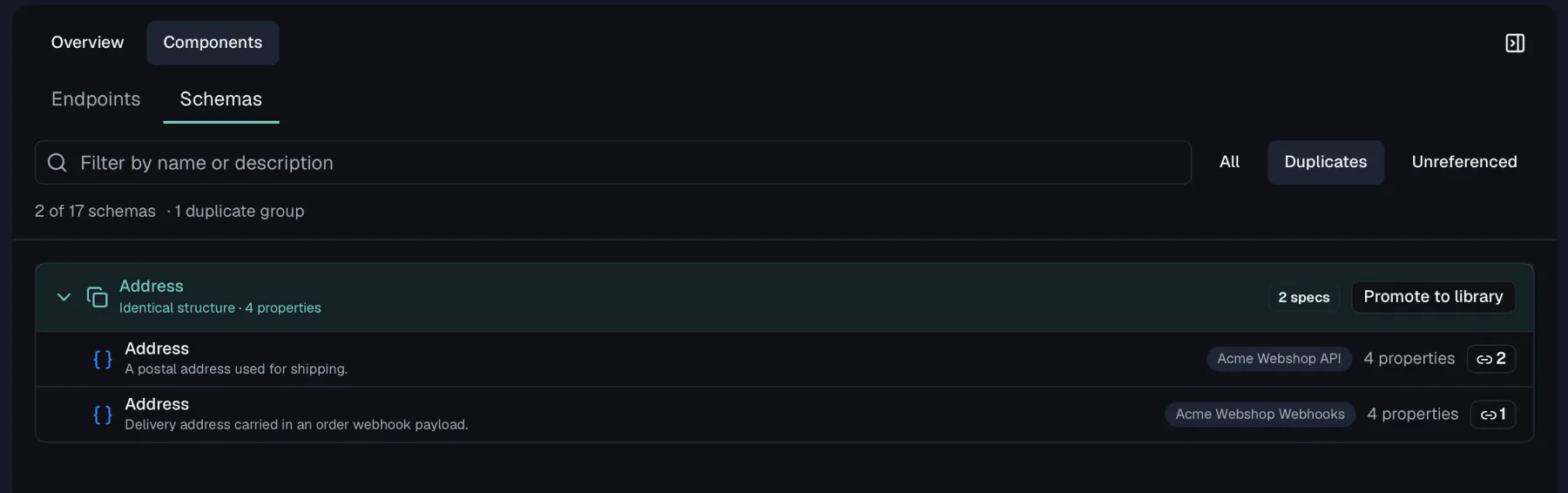
Components live inside one specification, but the duplication you want to find usually happens between specifications, as with the same Address schema written three times because three teams needed it. The project components view answers that by listing endpoints and schemas across every specification in the project, with each row badged with the spec it belongs to.
Two tabs, each with its own filters:
| Tab | Filters |
|---|---|
| Schemas | All, Duplicates, Unreferenced |
| Endpoints | All, Duplicates, Deprecated |
Duplicates is the interesting one, and neither tab detects them by name:
- Schemas are grouped by their structure.
Address,PostalAddressandCustomerAddressland in one group when their fields match, which is the case you would never find by searching. Each group can be promoted to the shared library in one step, turning three copies into one definition the specs reference. - Endpoints are grouped by method and normalized path, where parameter names are ignored and duplicate and trailing slashes are collapsed. So
GET /items/{id}andGET /items/{itemId}are the same endpoint, because the placeholder name is yours while the route is what callers see. Case is deliberately not normalized, because/Usersand/usersare different resources, so calling them duplicates would be wrong.
Unreferenced lists schemas nothing points at any more. They are the residue of refactorings, and the safest deletions you will ever make. The filter needs the usage counts to be loaded, so it stays disabled for a moment after opening the tab.
Filter by name, description, path or summary, and narrow to a single specification when a project has grown past the point where the full list is useful.
Shared library
Components that should be identical across projects, such as a company-wide error response or schema, live in the shared library. Use Promote to Library on a schema or response component to publish it, and the Shared subsection's + button to link library components into a spec. Linked components carry an Org or Project badge and show a pulsing indicator when a newer library version is available, which you accept with one click. They can be unlinked at any time.
Permissions
Creating and editing components requires specs:write, which the Member role includes. Deleting components requires specs:delete, and promoting to the library requires specs:write. The corresponding menu items are hidden without the permission. On a published, locked version all component editing is read-only.
Related
- Schemas — reusable data structures in depth
- Responses — where response components are used
- Parameters — where parameter definitions are used
- Header policies — inject headers across endpoints
- Shared library — share components across projects