

MCP Authentication
Every call to the Routebase MCP server is authenticated, and you have two options. An API key is the simplest and works with every client, while OAuth 2.1 suits clients that support it. This guide covers both, explains how scopes control what an agent can do, says what an agent can never do regardless of scopes, and shows how to keep your credentials safe.
API keys
An API key is the quickest way to connect. Create one under Settings → API Keys, choose its scopes, and restrict it to a single project wherever you can.
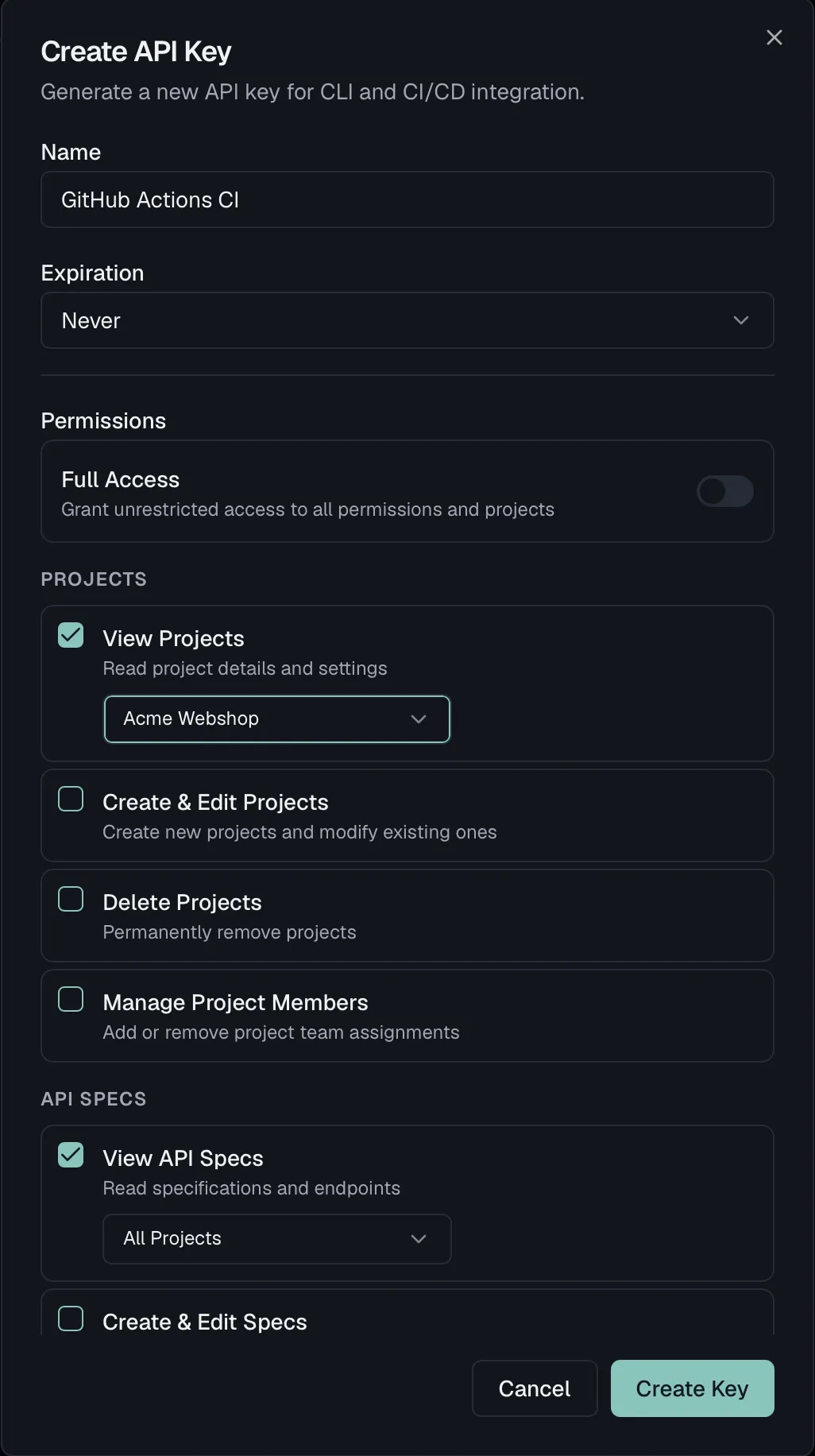
How you present the key depends on how you connect:
- Remote HTTP takes it as an
X-API-Keyheader on requests tohttps://mcp.routebase.dev. The olderhttps://api.routebase.dev/mcpstill works. - The stdio CLI
routebase-mcptakes it in theROUTEBASE_API_KEYenvironment variable, and it attaches the header for you.
Scopes control what the agent can do
A key carries a set of scopes (permissions), and they are enforced in two places:
- Tool discovery means
tools/listonly advertises the tools your key's scopes allow. A read-only key never even shows write tools, so the agent does not try them. Scoped keys see their full entitled surface immediately, across all toolsets, and the same applies when you connect via OAuth sign-in, where visibility follows your organization role. Use a custom role there for least privilege. A key without scopes is full access and sees every tool immediately. The lean core set withenable_toolset, which is progressive disclosure, applies only to a session that has not authenticated yet, and hidden tools remain callable throughout. For MCP connectors, sign in via OAuth or give the key explicit scopes, and the right tools are there from the firsttools/list. - Tool execution means every
tools/callis checked server-side. Calling a tool your key cannot use returns a clearForbidden: … required scope …error.
Grant the least privilege that gets the job done:
| Task | Scopes |
|---|---|
| Explore specs, projects, tests (read-only) | specs:read, projects:read, tests:read |
| Design and edit API specs | specs:read, specs:write |
| Publish specs | specs:publish |
| Run tests | tests:read, tests:execute |
| Manage mock servers | mock-server:read, mock-server:manage |
| Author documentation / sync to a portal | specs:read, specs:write, docs:manage-portal |
| Triage security findings | security:read, security:write |
| Run security scans | security:read, security:execute |
| Watch APIs for contract drift | monitoring:read, monitoring:write, specs:read |
| Branch, review and merge a spec | specs:read, specs:write, specs:branch, specs:review, specs:merge |
Pair scopes with a project restriction whenever you can, because a key scoped to one project cannot touch the rest of your organization, no matter what an agent asks it to do.
Every scope the MCP tools use
There are thirty scopes in total. If a workflow needs a tool you cannot see, this is the table that tells you which scope to add.
| Scope | Unlocks |
|---|---|
specs:read |
Reading specs, endpoints, schemas, versions, branches, style-guide state, audit log and deprecation plans. This is the widest read scope. |
specs:write |
Creating and editing specs, endpoints, parameters, responses, schemas, folders, tags, versions and components. |
specs:delete |
Deleting any of the above, plus retiring a deprecation. |
specs:publish |
Publishing a version, changing version status, scheduling a publish, notifying dependent owners, reviewing a deprecation plan. |
specs:branch |
Creating and managing branches and merge requests. |
specs:review |
Reviewing a merge request (approve / request changes). |
specs:merge |
Merging a merge request. |
projects:read |
Projects, environments, environment variables, the project dashboard, cross-entity search. |
projects:write |
Creating and updating projects and environments, project settings, setting and importing variables. |
projects:delete |
Deleting a project or an environment. |
tests:read |
Suites, cases, runs, results, fixtures, seeds, snapshots, request configs, resolved auth, schema-drift checks. |
tests:write |
Creating and editing everything under testing, which covers cases, assertions, scenarios, fixtures, seeds, schedules and auth configs. |
tests:execute |
Running things, meaning test cases, suites, scenarios and seeds, plus recording or restoring a snapshot. |
mock-server:read |
Mock server config, rules, request logs, smart-mock previews and diagnostics. |
mock-server:manage |
Creating and editing mock servers and rules, generating rules from a spec, clearing request logs, rotating the access token. |
docs:read |
Doc pages, tree, revisions, snippets, templates, portal pages, settings. |
docs:write |
Creating and editing documentation, folders, snippets, snapshots and the doc tree. |
docs:publish |
Publishing a doc version, cloning it, managing version lifecycle. |
docs:manage-portal |
Portal settings, branding, custom domains, builds, deployments, analytics, page feedback. |
monitoring:read |
Monitors, checks, incidents, alert policies, maintenance windows, contract drift, schema-drift reports. |
monitoring:write |
Creating and managing monitors, alert policies, incidents, maintenance windows, drift events and drift watches. |
security:read |
Findings, security score, scan runs, scan profiles, personas, guidance, remediation, SARIF export. |
security:execute |
Starting and cancelling a security scan. |
security:write |
Changing a finding's status, managing scan profiles and personas. |
notifications:read |
Webhooks and their delivery history. |
notifications:manage |
Creating, updating, testing, toggling and deleting webhooks, and rotating a webhook secret. |
billing:read |
Read-only. Subscription, usage limits and credit balance, and nothing more, as described below. |
org:manage-governance |
Org-level governance, covering style-guide settings and custom rules, org header policies and components, the shared library, org mock defaults, org fixtures, seeds and snapshots, org variables, and the secret audit log. |
org:manage-settings |
Org doc templates and org-wide notification defaults. |
org:manage-teams |
Listing teams, which is read-only because no MCP tool changes one. |
Scopes not in this table are not used by any MCP tool. That is not an oversight, and the next section explains why.
What an agent cannot do
Scopes decide what an agent is allowed to do. Some things are not a permission question at all, because no tool exists to do them. This is deliberate, and it is the part worth checking before you hand a key to an autonomous agent.
It cannot spend your money or change your plan. The entire billing surface is four read-only tools, which report the current subscription, usage limits, credit balance and trial status. There is no tool to change a plan, buy seats, purchase or spend credits, or touch a payment method. billing:read is the only billing scope any tool asks for, and there is no writable counterpart to grant.
It cannot change who has access. The identity surface is read-only too, so it lists members, teams, custom roles and your own effective permissions. No tool grants a role, invites or removes a member, edits a custom role, changes SSO or SCIM configuration, creates an API key, or deletes an organization. The corresponding permissions exist in Routebase, and an admin has them in the web app, but no MCP tool consumes them, so no key and no OAuth session can reach them.
It cannot read your secrets back. Secret variables are write-only through MCP, because every read masks the value without exception. That has a visible consequence worth knowing in advance. When a tool updates a secret variable, the new value is required, because the tool genuinely cannot retrieve the stored one to keep it.
It cannot read a mock server's access token. get_mock_server returns the configuration and URL but never the token. The only MCP path to a usable token is regenerate_mock_server_token, which issues a fresh one and invalidates the old one immediately. That is a rotation you chose rather than a quiet read. The Quickstart has a recipe for doing this once and storing the result as a secret variable.
None of this depends on you configuring it correctly. It is the shape of the tool surface, and it holds for every key, every OAuth session, and every organization role.
OAuth 2.1 (Remote HTTP)
For MCP clients that support it, Routebase accepts OAuth 2.1 bearer tokens, so nothing long-lived lands on disk. This is the path the Claude connector uses, and the Quickstart covers the three-step setup. It is also what the MCP Inspector and other spec-current clients discover on their own.
What happens when you connect
- You add
https://mcp.routebase.devas a server. The client's first call is unauthenticated and comes back 401 with aWWW-Authenticatechallenge pointing at the metadata document. A client can therefore find its way from a plain rejection, without you configuring an authorization server. - The client reads the metadata, discovers
auth.routebase.devas the authorization server, and opens a Routebase login window. - You authorize. From then on the client sends
Authorization: Bearer <token>and refreshes on its own.
Tool visibility follows your organization role, which in practice means the agent sees exactly the tools you could use yourself in the web app and no others. An Owner's connector shows the write tools, a Member's shows fewer, and a custom role shows precisely what that role grants. If you want an agent that can read but not change anything, give the person connecting a read-only custom role, or use an API key with read scopes instead, which is the more direct lever.
There is nothing to rotate and nothing to leak, which is why OAuth is the better choice wherever your client offers it. The trade-off is that the agent's reach moves with your role, so changing the role changes the connector's toolbox with it.
The metadata document
The server publishes Protected Resource Metadata per RFC 9728 at this address:
https://mcp.routebase.dev/.well-known/oauth-protected-resource
which points clients at the authorization server:
{
  "resource": "https://mcp.routebase.dev/",
  "authorization_servers": ["https://auth.routebase.dev/"],
  "scopes_supported": ["projects:read", "specs:read", "specs:write", "tests:execute", "docs:manage-portal", "..."],
  "bearer_methods_supported": ["header"],
  "resource_documentation": "https://docs.routebase.dev/mcp-quickstart/"
}
RFC 9728 requires resource to identify the host you actually talked to. The older host therefore publishes its own document at https://api.routebase.dev/.well-known/oauth-protected-resource, carrying "resource": "https://api.routebase.dev/", along with its path-scoped …/mcp variant. The authorization server is the same either way.
Rate limits
The MCP endpoint has its own budget, separate from the REST API. An agent working through a spec makes many small sequential calls, and it should not be able to exhaust your application's quota by doing so.
The budget is 200 requests per 60 seconds, counted per authenticated user over a sliding window. Over the limit, calls are rejected with HTTP 429 and a Retry-After header saying how long to wait. They are not queued, so a well-behaved client backs off and retries rather than blocking.
In practice this is generous enough that normal agent work never touches it, because a full spec review is a few dozen calls. The workflows that can reach it are bulk ones, such as generating rules or monitors across a large spec, or a loop that walks hundreds of endpoints one at a time. Where a bulk tool exists, meaning bulk_update_endpoints, generate_rules_from_spec and generate_monitors_from_spec, it is both faster and cheaper against this budget than the per-item equivalent.
Keeping credentials safe
- Minimize scopes. Start read-only and add only what the agent actually needs, using the scope table above as the menu.
- Scope keys to a project when the work is project-specific.
- Never commit keys. Keep them in environment variables and reference them indirectly in config, as in
"ROUTEBASE_API_KEY": "${ROUTEBASE_API_KEY}"inmcp.json, with the real value in your shell profile. - Rotate regularly, and set an expiry where your workflow allows it.
- Revoke immediately if a key is exposed. Delete it under Settings → API Keys and issue a new one. Anything built on the old key stops working at once, which is exactly what you want.
- Prefer OAuth where your client supports it, because short-lived tokens beat long-lived secrets.
Related
- MCP Quickstart — connecting a client, sessions, toolsets
- MCP CLI Reference — the stdio bridge and its environment variables
- Resources & Prompts — read-only context URIs and guided workflows